
This guide covers Trello tips with practical steps you can copy into a real project.
Trello tips
What is Trello?
Trello is a web-based project and task management tool. With Trello we can collaborate with team members and clients.
In other words, Trello is a whiteboard filled with lists of sticky notes, with each note as a task for you and your team. Imagine that each of those sticky notes can have photos, attachments, documents, comments, and discussion. The best part is that you can keep this whiteboard with you in a web browser at the office or as an app on your phone.
Trello gives us flexibility, accountability, visualization, and organization.
Why Trello?
- Easy-to-use, Visual Organizational Tool
- It replaces long email threads and chat tools
- All project information at one place
- We can set project flow as per our requirement
- Cross-Platform & Responsive
- Best notification system
- User-friendly. Anybody can use Trello
- Trello supports other apps such as Slack, Dropbox, Google Drive, Figma, GitHub, etc.
We can use Trello for:
- Project & Product Management
- Marketing, Sales and Support
- Plan a vacation and travel
- Run a Blog or Website
- Recruiting pipeline & Interview pipeline
- Plan a Wedding & Event
- Plan a Birthday Party
- Record Children’s Milestones
Trello terminology
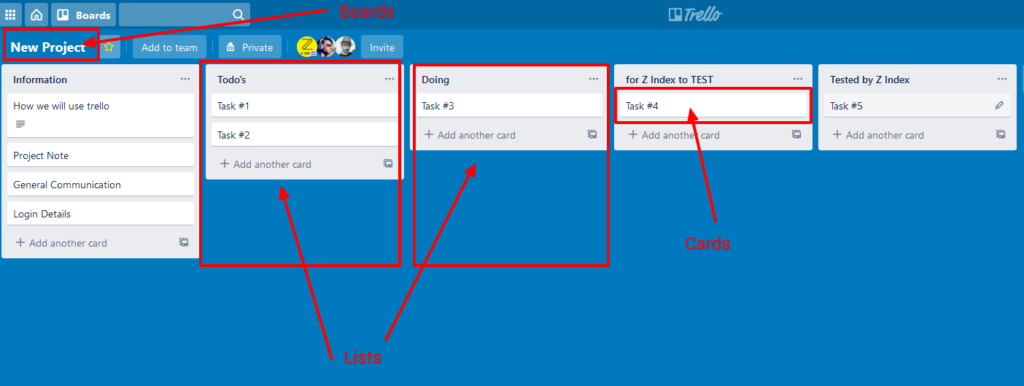
Boards: The Virtual Whiteboard
It can be your project name, your blog name, a birthday party name, etc.
Lists: Categorizing your Activities
For example: Information, To-dos, Doing, For test, Tested
Cards: Work and Task Name
Like Task: 1, Task: 2, Task: 3, Task: 4 etc
Related reading
Questions? Use the contact page.
Reference: Trello guide.
