
This guide covers WordPress delete_user custom table with practical steps you can copy into a real project.
WordPress delete_user custom table
In a recent project, we needed to delete some data from a custom table when a user was deleted. After about 10 minutes of searching on Google, we found the solution below.
Note: When a user is deleted, the “delete_user” action is called, as shown below.
add_action( 'delete_user', 'function_name' );
Let me explain, step by step, how to delete data from a custom table.
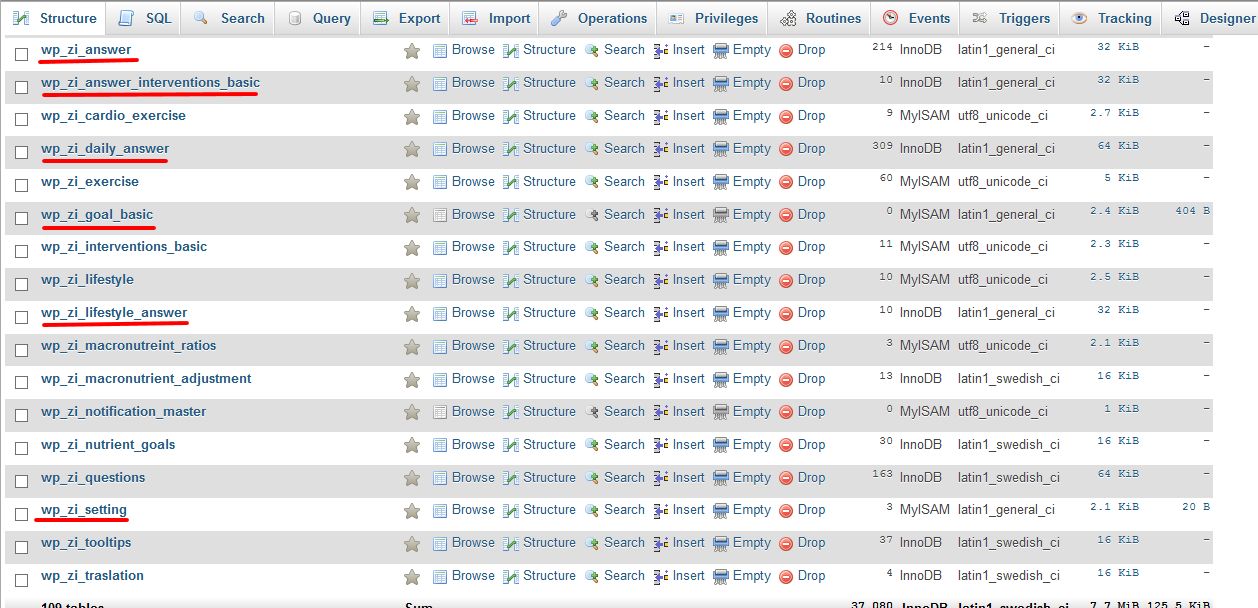
In our case, we had to delete data from six tables, as shown in the screenshot.
The PHP code is below.
function zi_delete_user( $user_id )
{
    global $wpdb;
    // get user details base on  user id
    $user_obj = get_userdata( $user_id );

    // Array of all tables
    $tables = array('wp_zi_answer', 'wp_zi_answer_interventions_basic', 'wp_zi_daily_answer', 'wp_zi_goal_basic', 'wp_zi_lifestyle_answer', 'wp_zi_setting');

    foreach($tables as $table)
    {
        // Delete all data have deleted user id
	$query_zi_table = $wpdb->query("DELETE FROM `user_id` where `user_id` = ".$user_obj->ID."");
    }
}
add_action( 'delete_user', 'zi_delete_user' );
Check it out and let me know if you have any questions.
Related reading
Questions? Use the contact page.
Reference: WordPress delete_user hook.


Recent Comments